
Local Insights

We’ve got some great news that’s going to change how you buy and sell on our platform. We’re excited to introduce Listing Videos—a new feature designed to make KSL Classifieds even better. Whether you’re selling or buying, Listing Videos will take your experience to the next level.
Now you can add videos to your listings on KSL Classifieds! This feature is designed to make listings more engaging, informative and appealing. Videos can showcase your items in a way that photos and text alone can't match. As a shopper, you’ll get more information about an item than ever before.
Using videos in your listing brings plenty of benefits, the main one being that you'll attract a wider audience. Younger shoppers, who favor visual content over lengthy descriptions, will be especially drawn to your listing.
Videos also give potential buyers a clearer look at your item’s condition compared to photos. This builds trust and lets them feel confident about their interest in your item.
Additionally, videos keep shoppers engaged longer. More time spent on your listings means less time spent on other listings, improving your chances of making a sale. Videos also make it easier to get all the necessary information about an item quickly and effectively, without wading through a bunch of information.
High-quality videos can make your listings look more professional, attracting serious buyers who appreciate detailed and clear information.
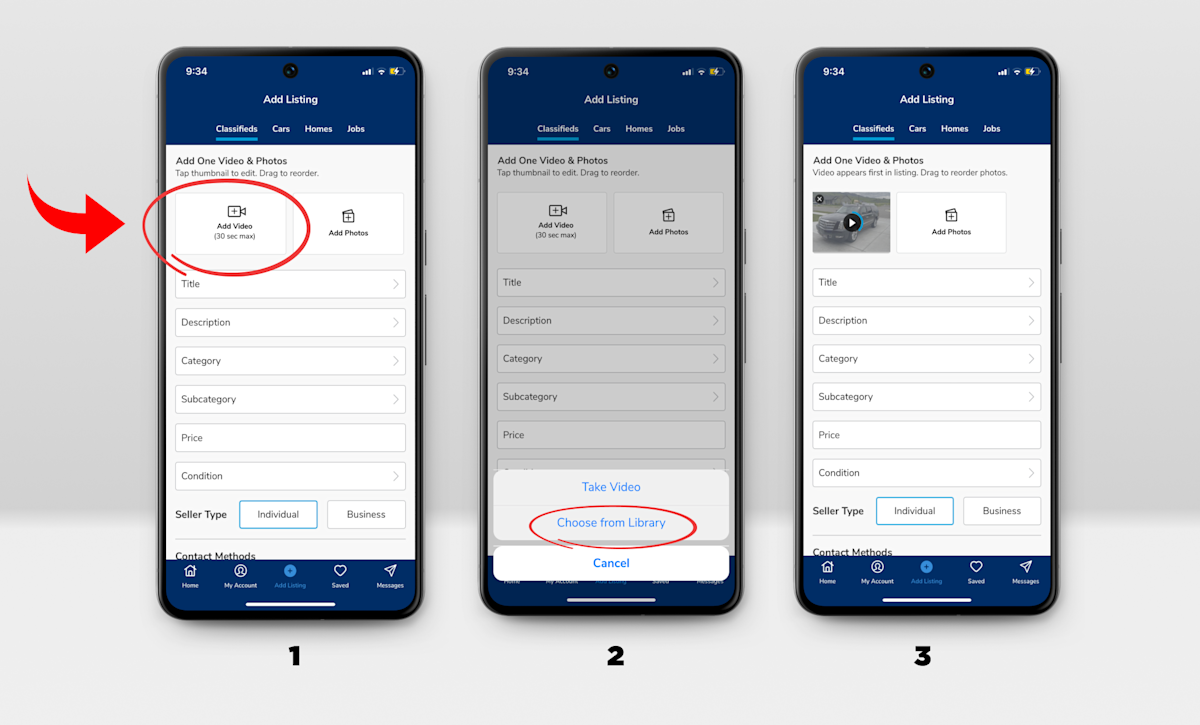
Uploading a video is easy. First, ensure your video meets our terms of use, and that it’s under 30 seconds long. When you start a new listing, look for the Add Video button at the top of the screen. Click it to upload your video. Double-check that the correct video is uploaded, then finish creating your listing. Once you submit, the video will appear on your listing’s detail page.
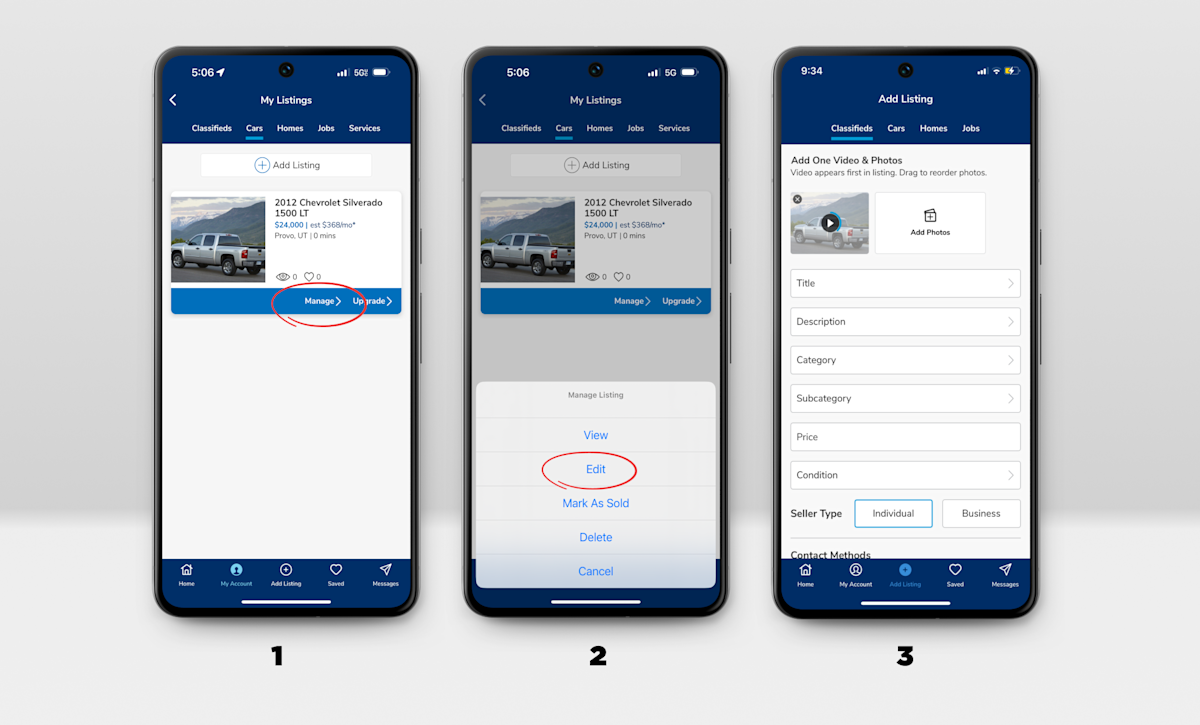
You can also add a video to an existing listing by going to My Listings in My Account. Tap Manage, then Edit on the listing you want to update.
Add a video to your listing now!
Here are some tips to make your Listing Video an effective selling tool:
Focus on the item: Make your video all about the product. Highlight its unique features and be honest about any flaws. Skip the fluff and distractions.
Lighting and sound: Use good lighting and clear audio. Natural light is best, but when it’s not possible, use artificial light to get rid of harsh shadows. If you’re talking, make sure your voice is easy to hear.
Steady camera: Keep your camera steady. A tripod or stable surface can help. Show your item at different angles for a complete view.
Keep it short: Aim for under thirty seconds. Short and sweet keeps viewers’ attention.
Follow guidelines: Stick to KSL Classifieds’ terms of use. Don’t use copyrighted content.
Be Professional: Steer clear of offensive language or inappropriate content. Focus on showcasing the item, not yourself.
Make sure to show off features that photos might miss. Invite viewers to reach out for more details or to make an offer. Adding captions or text overlays can help point out important aspects of your item and give extra info.
Check out our current listings to see how others are using videos. Then, create your own Listing Video and see the benefits for yourself. Whether you're buying or selling, KSL Classifieds is here to make things easier for you.
Listing Videos on KSL Classifieds is a game changer. Use these tips to create videos that attract serious buyers and make your listings stand out. Embrace the power of video and watch your listings come to life!
So, what are you waiting for? Start browsing, listing and selling today and take advantage of our new Listing Videos feature.